
Download Swift Product – AI‑Assisted Product Development Tool
Overview
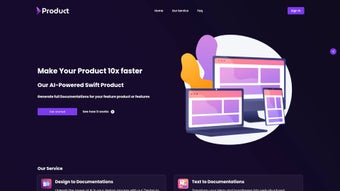
Swift Product is a cutting‑edge AI‑assisted software application built to accelerate every stage of product development. Whether you are a solo designer, a startup founder, or part of a large engineering team, Swift Product turns the often‑time‑consuming tasks of creating detailed documentation into a single click. The platform offers two core services: “Design to Documentation,” which intelligently interprets sketches, wireframes, or high‑fidelity mockups and generates comprehensive specification files, and “Text to Documentation,” which converts plain‑language ideas, feature briefs, or meeting notes into polished, ready‑to‑share documents.
By automating these repetitive processes, teams can focus on creativity, validation, and iteration rather than manual paperwork. Swift Product also places a strong emphasis on data privacy; users have full control over their historical data and can delete any record at any time. Secure, encrypted storage ensures that proprietary designs and strategic plans remain confidential.
The upcoming Jira plugin promises seamless synchronization with project‑management workflows, allowing generated content to flow directly into sprint backlogs or issue tickets. In short, Swift Product is a free‑to‑download, secure, and constantly evolving tool that bridges the gap between design, ideas, and documentation, delivering a faster, more organized development pipeline.
Key Features that Power Your Workflow
- Design‑to‑Documentation Engine: Upload PNG, SVG, or Figma links and receive auto‑generated spec sheets, component breakdowns, and interaction notes.
- Text‑to‑Documentation Converter: Paste bullet points, user stories, or free‑form text and watch the AI produce structured requirement documents with tables, diagrams, and version control.
- AI‑Driven Consistency Checks: The system cross‑references new documentation against existing assets to flag duplicate or contradictory specifications.
- Secure Data Management: End‑to‑end encryption, optional on‑premise storage, and a one‑click “Delete History” button give you complete control over your intellectual property.
- Multi‑Platform Access: Web‑based interface works on Windows, macOS, Linux, Android, and iOS browsers without additional installations.
- Future‑Ready Integrations: Upcoming Jira plugin, GitHub Actions hook, and Slack bot to push documentation directly into your development pipelines.
- Version History & Collaboration: Real‑time co‑authoring, change tracking, and export options (PDF, Markdown, DOCX) keep every stakeholder on the same page.
Installation & Usage Instructions
Getting started with Swift Product is intentionally frictionless. Because the application runs entirely in the cloud, there is no need for complex installers or administrative privileges. Follow these steps to download, set up, and begin using the tool:
- Visit the official website: Navigate to swiftproduct.io/download and click the “Free Download” button. The site will detect your operating system and present a direct link to the web‑app or a lightweight desktop wrapper for Windows, macOS, or Linux.
- Create an account: Sign up using an email address or single‑sign‑on via Google or Microsoft. A verification email is sent to confirm ownership; this step also activates encrypted storage for your data.
- Configure privacy settings: In the Settings panel, toggle “Auto‑Delete History after 30 days” or manually erase any document you no longer need. These preferences are stored server‑side and respect GDPR and CCPA regulations.
- Upload a design: Drag‑and‑drop a design file (PNG, SVG, or a Figma share link) into the “Design to Documentation” workspace. The AI analyses layers, annotations, and naming conventions, then outputs a structured spec that you can edit or export.
- Convert text ideas: Paste raw text into the “Text to Documentation” field. Choose a template (Feature Brief, Technical Spec, or User Manual) and let Swift Product generate a formatted document complete with tables, flowcharts, and version numbers.
- Collaborate and export: Invite team members via email, assign editing rights, and watch changes appear in real time. When the document is final, click “Export” and select PDF, Markdown, or DOCX.
- Integrate with tools: Once the Jira plugin is released, simply enable it in the Integrations tab, link your Jira instance, and push newly generated tickets directly from the documentation view.
Because the platform is cloud‑native, updates are applied automatically. You will never need to download patches or worry about compatibility issues – the service scales to your device, ensuring a smooth experience whether you are on a high‑end workstation or a mobile phone.
Compatibility, Pros & Cons
Swift Product is designed to be truly cross‑platform. The web interface adheres to modern HTML5, CSS3, and JavaScript standards, guaranteeing full functionality on the latest browsers for Windows 10/11, macOS Monterey and later, Ubuntu 20.04+, as well as mobile browsers on Android 9+ and iOS 13+. A lightweight Electron wrapper is also available for users who prefer a desktop‑only experience without a browser tab.
Pros
- Fast conversion of designs and text into professional documentation.
- Zero‑install, cloud‑based solution works on any device.
- Robust privacy controls with encrypted storage and easy data deletion.
- Free core features; premium add‑ons (Jira plugin, API access) are optional.
- Real‑time collaboration reduces hand‑off friction between designers and developers.
- Future‑ready integrations keep the tool relevant as workflows evolve.
Cons
- Advanced AI features require an internet connection; offline mode is limited.
- Initial learning curve for non‑technical users unfamiliar with AI‑generated specs.
- Export options are limited to PDF, Markdown, and DOCX; native formats like .sketch are not yet supported.
- Free tier includes a usage cap of 20 documents per month, which may be restrictive for large teams.
- Jira plugin is still in beta and may have minor compatibility quirks with older Jira Server versions.
Frequently Asked Questions
Is Swift Product really free to use?
Yes, the core functionalities – Design to Documentation and Text to Documentation – are completely free. Premium features such as the Jira plugin, API access, and higher monthly document limits are offered through paid plans.
How does Swift Product protect my confidential designs?
All files are encrypted in transit (TLS 1.3) and at rest (AES‑256). Users can enable automatic deletion of historical data or manually erase any document. Swift Product complies with GDPR, CCPA, and ISO‑27001 security standards.
Can I use Swift Product on a Mac without an internet connection?
The AI conversion engine runs on cloud servers, so an active internet connection is required for the primary features. A limited offline mode allows you to view previously generated documents, but new conversions need connectivity.
What file formats are accepted for the “Design to Documentation” feature?
Swift Product accepts PNG, JPEG, SVG, and direct Figma share links. Future updates will add support for Sketch, Adobe XD, and InVision files.
When will the Jira integration be generally available?
The beta version of the Jira plugin launched in Q3 2025, and the full release is scheduled for early Q1 2026. Existing beta users receive early access and can provide feedback to shape the final product.
Conclusion & Call to Action
Swift Product stands out as a practical, AI‑driven solution that turns the often tedious task of documenting product designs into a fast, secure, and collaborative experience. By bridging the gap between visual concepts and textual specifications, it empowers teams to iterate quicker, reduce miscommunication, and keep every stakeholder aligned. The free tier provides ample capability for freelancers and small startups, while the premium roadmap—including the Jira plugin and expanded API—offers scalability for larger enterprises. If you’re looking to streamline your product development pipeline, protect your intellectual property, and stay ahead of documentation bottlenecks, Swift Product is a download worth trying today. Click the button below to start your free account, generate your first documentation in minutes, and experience the future of product development.
Review Summary
Swift Product delivers a compelling blend of AI automation, cross‑platform compatibility, and strong privacy safeguards. While the free tier’s document limit may feel restrictive for heavy users, the overall value proposition is excellent for teams seeking to cut down on manual documentation work. The upcoming Jira integration promises to further cement its place in modern DevOps workflows.
Pros
- Rapid AI‑generated documentation.
- Secure, GDPR‑compliant data handling.
- Real‑time collaboration across devices.
Cons
- Requires internet for core AI features.
- Limited offline export formats.
- Free tier usage caps.



.png)



